Receive all updates via Facebook. Just Click the Like Button Below

Powered By EXEIdeas

About U

IP

Saturday, 1 December 2012

airtel 3g trick december 2012 Don't miss it


  This trick is working  for block airtel sim also.Airtel gprs trick is working again with new proxy setting.I hope you will enjoy this trick::>


Steps:>

Step 1 : make new setting for free gprs


APN:Airtelgprs.com
PROXY:  any one of below
      1. 67.208.113.125
      2. 37.157.196.129
      3. interrobangpath.org
      4. k12history.com
      5. 173.242.124.71
      6. simproxy.com
     7. 69.10.57.139
PORT:80
HOMEPAGE: 203.115.112.27or 122.170.122.202

Friday, 30 November 2012

iTunes 11 now launched

 
We were expecting it to be out at the end of October, but the wait is now over: Apple has just released iTunes 11 for Windows and Mac. And it’s not difficult to imagine why there might have been some delays, because this is a significant upgrade.
A revamped interface makes it easier to view your library by songs, albums, artists, videos and more, for instance. And if you click an album, say, it now expands in place, so you can see the track listing and start playing something without ever moving away from the library view.
This new approach means you could quickly have a queue of tracks waiting to be played, of course. The new Up Next feature helps you keep control, though, displaying the tracks you’ve set up so far, and allowing you to delete items (or add others) as you like. And creating full playlists is now also improved, requiring little more than a few drag and drops.
The new-look interface expands your album track listing within the regular library view
Elsewhere, the MiniPlayer has been revamped with many new features. The Up Next list is included here, too, and you can now find and add new tracks without ever having to open the full library.
If you’d like to find new music, then the new “In the Store” button will help, showing you items related to whatever you’re viewing currently (though not in an intrusive way, you won’t get this unless you go looking for it).
The store itself now has a more unified look, so it’ll feel the same whether you’re using your tablet, phone or desktop.
And if you’re a cross-platform user then you’ll also appreciate that iCloud now remembers where you are, so if you pause a movie or podcast on one device, then you can start it on another and carry on exactly where you left off.
Put it all together and iTunes 11 has plenty to explore. If you have a previous version installed then the program should detect the new release already (Help > Check for Updates, if not), otherwise you can download the new release now.

New BEST UNINOR TRICK TO GET FREE GPRS AND INTERNET DEC 2012.


If this works share this free gprs trick
If you have an Uninor network
connection then by using below
trick you can able to get free
GPRS and Internet.
Five Simple Steps for Free Uninor
GPRS:
1. Firstly make a new profile in
your mobile handset, give it some
name like "FreeGPRS".
2. Connection Name: give any
name
APN : Uninor
Proxy address: 10.58.10.58
Port : 80
3. Save the Configuration.
4. Restart your mobile now.
5. Now open this URL
"wap.myuninor.in.php.t9space.
com", set this as your homepage
would be a best thing.
Enjoy !!!! this free Uninor GPRS Trick.
Its works for me

vodafone new vpn trick for rajasthan user

By this New VPN you have no balance deduction, no disconnect problem

apn : www
Balance condition: 2 rs

Speed up -to 200-250

paste config nmd vpn
Download vodafone(net3rks_tk).rar Config.
note: only for Rajasthan users.. But try everyone and drop your comments

Free December 2012 BSNL 2g/3g Gprs trick

Bsnl free 2g/3g gprs trick for both surfing and downloading with high speed proxy.
Using this trick you can easily get internet in your mobile using BSNL.
Follow these simple steps

Step 1  Make a new config setting as per below in your mobile.

Proxy  192.168.27.123 OR 192.168.45.122

Port  8080

APN  celloneportal or bsnlnet

HomePage  http://google.com

Tuesday, 27 November 2012

How To: Take Nandroid backups without rebooting it

A utility to perform Nandroid backups without the need to reboot and enter the recovery mode.
How To: Take Nandroid backups without rebooting
Most Android-based smartphone users today would definitely know the terms ‘Rooting’, ‘ROM flashing’ and ‘Nandroid’. Those who constantly keep flashing their phones with new ROMS, tweaks and updates would know the importance and criticality of taking backups before flashing their phones. Backing up the presently installed and working operating system before flashing a new ROM or tweak involves performing Nandroid. This means one would have to turn off the phone and reboot it into the recovery mode, then select the backup function and perform the Nandroid. The entire procedure wastes a lot of time rebooting the phone and most importantly, you spend a lot of time keeping your phone offline and might even miss important calls and messages.
Nandroids are usually taken from recovery modes


There is a very fast and easy method by using a simple app to take a complete ROM backup or Nandroid without switching off your phone. No doubt, installing a ROM or flashing a tweak would still require you to switch off the phone and do the needful in the recovery mode. However, using this method you can at least save on 60 percent of your time. This method can also benefit those who keep installing various apps and like to play with different scripts and kernel tweaks. They would prefer to take repeated backups of their ROMS before and after the tweaking.

The app we are about to show you is available for free on the Google Play Store and is developed by Ameer Dawood. He developed this app because he constantly does Nandroid backups and does not want to waste time rebooting and entering the recovery mode. We shall show you how you can do the same. Before we get down to it, you would need to download and install two apps on your phone. The first is Online Nandroid and the second one is BusyBox installer.
Update BusyBox on your phone using the updater app


Online Nandroid is the tool that takes Nandroid backups while your OS is online, and you do not need to reboot into the recovery mode for backups anymore. The app backs up the partitions such as boot, recovery, system, data, cache, cache data, dalvik cache, .android_secure, sd-ext, Appslog and any other partitions you have on your phone. The date format used for folder name is the same used by CWM itself and Nandroid backups created with Online Nandroid can safely be restored using CWM recovery.
Get the script installed for Online Nandroid to work


Let’s get started. Before you begin, you need to make sure you have the latest version of BusyBox or at least version 1.20 and above. For this, start the BusyBox app and update the version over the Internet. If you run the Online Nandroid app, the utility will also detect the BusyBox version and exit if the requirements are not met. Now start the Online Nandroid app. Online Nandroid is actually a script with a graphical user interface that runs in the background and takes the backups. You need to install this script initially and Online Nandroid will automatically do it for you. Once you click on the app, you will be greeted with a large dialog box stating that you don’t have the script and prompting you to download it—click ‘Yes’. The new version of the script will be automatically downloaded and installed at the required location. Later, the display will give you details of the script version on screen. You are now ready for a Nandroid without rebooting.
Start backing up using the Online Nandroid backup utility


On the Online Nandroid screen, select the name format you would like for your backups. You have a choice between custom name, UTC time zone name and phone time zone name. Preferred option would be a custom name as you can add the ROM name, date and time as per your choice. Select the custom name and hit the ‘Start Backup’ button. The next screen will ask for a confirmation and the screen after that will prompt you to enter the custom name for your backup. Feed in the requirements and click on the ‘OK’ button. The backup will start immediately and you can see the entire process in verbose mode on your screen. Depending on your phone’s speed and ROM type, the entire process can take anywhere between 5-10 minutes.
Backups are made and can be restored using CWM easily


The backups are finally stored in the folder ‘/SDCARD/ClockWorkMod/Backup/<your custom backup name>/’. You can safely restore this backup anytime using the recovery mode.

Tweeting up a storm

Twitter, with its 140 characters limitation notwithstanding, is infamous for landing many in trouble. We take a look at some Twitter controversies that rocked the social media scene in the recent past.
Tweeting up a storm
The use of social media by brands has become commonplace. However, lack of proper understanding of the medium could lead to embarrassing situations. Unlike a print ad that could be soon forgotten, a gaffe on social media can cause a lot of damage due to its viral nature. We have seen several instances of brands, as well as renowned personalities, finding themselves in the midst of a controversy due to their social media antics. Especially, Twitter, with its 140 characters limitation notwithstanding, is infamous for landing many in trouble. We take a look at some Twitter controversies that rocked the social media scene in the recent past.

Watch your wicket

Suresh Raina learns it the hard way

Suresh Raina learns it the hard way


Suresh Raina, the rising Indian cricketer, has been the latest to commit a faux pas on Twitter. While India beat Pakistan in the recent ICC T20 World Cup play-off matches, it was Pakistan who entered the semi-finals. As it turned out, Pakistan was sent packing home by Sri Lankan team who made it to the finals. A tweet from @ImRaina taking a potshot at the archrival's loss in an unsavory manner read "Ek do din late gaye ghar !!!! Woh bhi besharam ki tarah Gaye... Bye bye Pakistan!!!!." This tweet obviously made news and Raina received a lot of flak for the unsportsmanlike attitude. He later deleted the tweet and provided explanation that the tweet was actually posted by his nephew using his Twitter handle and he was clueless about the same. He nonetheless offered an apology. While it’s difficult to know how much of truth there is to it, some enterprising folks on Twitter have gone ahead and created a parody Twitter account - @raina_nephew.    

Mixed-Up

KitchenAid got mixed-up by taking on Obama

KitchenAid got mixed-up by taking on Obama


A couple of days ago, KitchenAid, a brand in US that is known for hand mixers and blenders, found itself in a soup over a tweet. It’s very common for brands to tweet about the on-going events, while promoting their brand. With the U.S. presidential elections just around the corner, the presidential debate was one such event that gained much hype over the social networks. In fact, according to reports, it became the most tweeted about event in US politics with more than 10 million tweets sent during the 90-minute live event. While we may all have our favourites, as a brand you need to be careful about expressing your opinions. That’s where KitchenAid went wrong, as it made reference to President Obama’s late grandmother in a tweet that said, "Obamas gma even knew it was going 2 b bad! 'She died 3 days b4 he became president." Needless to say, it caused quite a controversy. Even though they were quick to delete the tweet, many had already retweeted it and not to mention taken a screenshot, which was then widely circulated online. KitchenAid, while apologising to the first family, provided an explanation saying that the tweet was carelessy sent by one of their team members and that the concerned person wouldn’t be tweeting for them anymore.

Vibrate or Shiver?

Shiver or Vibrate? Not to sure...

Shiver or Vibrate? Not too sure...


Volkswagen, the German automobile manufacturer and the company behind the iconic Beetle, has time and again come up with novel ad campaigns sparing no expense. Back in 2010, it caught people off-guard with its talking newspaper ad. A small speaker device was implanted on the last page of the newspaper and as soon as people turned to the last page, the device trigged the audio message about its new car Vento. It was novel, never seen before in India and was well received. However, Volkswagen wasn’t that fortunate the second time around. In September, readers of leading dailies were treated to vibrating newspaper, thanks to Volkswagen. The front page ad inquired “Feel the shiver of excitement?” and the little black box embedded in the newspaper was supposed to let people experience the “shiver”. But unfortunately for Volkswagen, people perceived it as vibration more than shiver and took to social networks lampooning the ad using double entendre. Twitter especially was abuzz and what added fuel to the fire was a tweet from Volkswagen supposedly defending the creative campaign, but failed miserably. The tweet from the official Twitter handle @VolkswagenIndia read “Women would be dumb to call it a vibrator. Or maybe they do not understand real driving experience. #PunIntended #Volkswagen #Creative”. This tweet invited further wrath from people. And Volkswagen committed social media hara-kiri when it deleted the offending tweet by taking the usual line of account being compromised. And since then, the official Twitter account hasn’t been updated.

Mamma Mia, not quite

Hash tag gone wrong

Hash tag gone wrong


Another Indian brand that recently made a social media faux pas was Fortis Healthcare. Its Mamma Mia initiative on Twitter is aimed at pregnant women and new mothers, to guide them on their journey. To celebrate World Breast Feeding Week in August, it decided to launch a contest on Twitter urging people to use a certain hash tag and come up with creative one-liners. This was indented to spread awareness about benefits of breast feeding, however, it didn’t give much thought to the hash tag it chose. It urged followers to use #AgarMaKaDudhPiaHaiTo. Of course, everybody will identify those words that were spouted by Amitabh Bachchan in the movie Lawaaris in an angry overtone. Twitter users had a field day using the hash tag, coming up with absurd one liners referring to bollywood celebs and even our Prime Minister. Needless to say, the hash tag didn’t quite serve the intended purpose. To redeem itself, Fortis, too, just like Volkswagen, attributed the gaffe to its account being hacked. However, to give it credit, it recovered quickly and continued with the awareness campaign; of course, sans the hash tag. Looks like Fortis has learnt its lesson well and since then, has run several successful campaigns on Twitter.

Politically incorrect

Sashi Tharoor is well known for his Twitter gaffes

Shashi Tharoor is well-known for his Twitter gaffes


Shashi Tharoor has remained in the eye of the storm with his several foot-in-the-mouth tweets. A renowned member of parliament, he is quite active on the social networking sphere. First time around it was his cattle class remark that created an uproar. He used the word cattle class to refer to the economy class of the airlines. His remark was highly publicised by all the media channels so much so that the Congress termed it ‘absolutely insensitive’ and firmly stated that the party does not endorse his view. Though no disciplinary action was taken against him, the party did distance itself from the whole controversy. What went unnoticed, however, was the fact that it was not Shashi Tharoor who used the expression ‘cattle class’ in the first place. He was simply replying to a tweet by a prominent columnist who had used the expression. Then again, his public spat with IPL chief Lalit Modi was well chronicled on Twitter. After resigning from his post as the Minister of State for External Affairs, he remained inactive on Twitter for a little while, but he is back again and so far has managed to remain controversy-free.

While the list is endless, we have picked just a few. Apart from those mentioned here, do let us know the ones you find most amusing.

Google lets you insert Drive files directly into an email

If you use Google Drive to keep, create and share your documents – be it for official or personal purposes, then this update is sure to interest you. Phil Sharp, Product Manager at Google, shares that soon users will be able to insert files from Drive directly into an email, without having to abandon their mail.
Add files directly from Drive to Gmail


Available on the new compose feature, the way this new method works is that users will be required to click on the 'Drive' icon while composing an email. This way, users will be able to insert files up to 10GB, i.e. 400 times larger than what they could send typically as a traditional attachment. Sharp explains that because the file being sent is stored in the cloud, all of the user's recipients will be able to access the most up-to-date version of the file. This way, users can escape the common frustration of not being able to attach a file to an email because it's too large to send.
Prompts you to share your files


Interestingly, Gmail will also work like a smart assistant and double-check that the intended recipients have access to the files being sent. This way, whenever a user sends a file from Drive that isn't shared with everyone, he will be given the option to change the file's sharing settings, without moving away from his mail. Moreover, it will work with Drive links pasted directly into emails.

"So whether it’s photos from your recent camping trip, video footage from your brother’s wedding, or a presentation to your boss, all your stuff is easy to find and easy to share with Drive and Gmail," explains Sharp.

The new feature that will be rolled out over the next few days will only be  available with Gmail's new compose experience, so you'll need to opt-in if you haven't already.

Recently, Google also made it possible for users to search their Gmail messages by size, thanks to an update. The enhanced Search now has more flexible date options, exact match and other parameters. For example, emails 5MB or larger in size can be quickly located by using the operator 'size:5m' or 'larger:5m'. To search for email that are over a year older, users can enter 'older_than:1y' in the search box. This latest update is in line with the other recent enhancements done to Search, such as improved autocomplete predictions and a field trial for instant results from Gmail, Google Drive, and more, as you type.

Email, unlike instant messaging, tends to become a lengthy process. Switching between viewing older emails for reference, saving the current email as a draft and searching for an email message can become cumbersome. Google has now made composing emails easier by introducing the redesigned compose feature on Gmail. Composing an email now is quicker, for the compose box opens like a chat window, albeit a larger one. In its official Gmail blog post, Phil Sharp, Google’s Product Manager, shared that with this new design, it is possible to keep the compose mail box open and still look for older emails for reference. This way, users can also keep an eye on newer emails. Sharp writes, “The new compose is designed to let you focus on what's important: your message.”

ZengaTV launches virtual HD mobile TV


Next evolution in Mobile TVZengaTV today launched a virtual HD mobile TV app with social integration. First available on Android, the app provides the much needed alternative to the second TV needs of users.

The developers claim that ZengaTV delivers an immersive user interface with social media integration. The ZengaTV viewer features categories with search-optimised directory listings. Personalised playlist viewing helps users create their own channel lists of favourites. Advanced app design offers HD viewing and faster in-app browsing for Live TV, movies and VOD sections along with pause and play for VOD and movies.

Next evolution in Mobile TV


The developer claims that the app also supports many advertiser friendly features including support for Rich Media, Pre-roll videos, and ad wrapping technology that allow ads to be played at launch and closure of app. Data generation for extensive ad tracking and monitoring and compatibility with most ad networks are bonus.

Commenting on the launch of the next evolution in mobile TV, Shabir Momiin, MD and CTO, ZengaTV, said, “We believe that mobile TV is ready to graduate from occasional on the move TV snacking to being a enhanced second TV replacement; specially with widespread availability of affordable tablets. Accordingly, ZengaTV has invested close to 2000 man hours of R&D effort in rolling out the new app. The app features multiple innovations to enable a mobile TV lifestyle that matches the infotainment needs of current generation across age groups.”

Abhishek Joshi, CEO, ZengaTV, adds, “With this new app we have focussed on the needs of our two core constituencies, viewers and advertisers. Mobile advertising has been growing at exponential rate and video / mobile TV is one of the most compelling content options for advertisers. Being a free app, it was imperative that the experience for both, users and advertisers is superlative, and accordingly we have delivered. With this new app our bouquet of 130 channels will become even more enticing for our 22 million unique viewers.”

ZengaTV services are accessible across all leading mobile networks such as Idea, Vodafone, Airtel, Aircel, BSNL, MTNL, Reliance, Docomo as well as on the web. ZengaTV is accessible here. Users can also expect the upgraded ZengaTV App for the iOS platform to be launched very soon

Google's New Android OS On The Way


Bangalore: Google hasn’t come up with any updates for its latest offering Jelly Bean yet, but rumors are already making rounds about a new Android OS with the name Key Lime Pie.


Jelly Bean has turned out to be an impressive OS, with no actual bugs found till now, so the big question will, is Key Lime Pie will be just an updated version of Jelly Bean or a complete fresher. 


However along with the Lime Pie rumors, there were talks about the Jelly Bean updates too.


Android Authority, the Android News blog dedicated to provide expert tips, news, reviews, Android Phones, Android Apps and much more, says that the site was several times visited by the devices running on Android 4.2, and the blog concludes that Google might have started building the new OS in mid-August. “We have thoroughly checked our own server logs and Google Analytics data and found several traces of devices running Android 4.2 and checking out Android Authority during tests,” the site writes.


“Android Police (a web blog dedicated to everything related to Android) makes some clever connections based on what is known of Google’s way of doing things, but nothing is official until Google sings. What’s clear though is that the next Android iteration is Android 4.2, and should come in the coming weeks,” says Andorid Authority about the release date of the new


The site says that the devices like Google Nexus 7, Galaxy Nexus, Sony Xperia Arc S and Samsung Galaxy Y visited the sites. Two more devices visited, running on Android 4.2, called as Occam and Manta, which are reportedly code names for new Motorola Phones.


There are also speculations that the new OS will have some special Nexus program, which suggests that there could be line of Nexus phone offering from Google.

All are awaiting the possible announcements Google will make at Dive Into Mobile, the upcoming tech show and conference hosted by All Things D on October 29th and 30th. According to inside report the company may launch Nexus branded Smartphone than unveil a new OS.


More on Android 4.2 Key Lime Pie:
The reports by Tech Radar which first came up with Key Lime Pie to refer to Android 5.0, adds fuel to the rumors. Though the Android 4.2 seems to be the iterative update than a next major update, the company prefers a fresh code name according to the reports.


The OS is said to add some improvements to current Jelly Bean updates, and with more feature like, better multiple device support, social media integration, customization center, line-drawing keyboard options and more.


The reports by Tech Radar which first came up with Key Lime Pie to refer to Android 5.0, adds fuel to the rumors. Though the Android 4.2 seems to be the iterative update than a next major update, the company prefers a fresh code name according to the reports.


The OS is said to add some improvements to current Jelly Bean updates, and with more feature like, better multiple device support, social media integration, customization center, line-drawing keyboard options and more.


Trick To Boost Torrent Speeds Using UTorrent Turbo Booster Plugin


uTorrent Turbo Booster is a recent plug-in designed to improve the functionality of probably the most popular P2P file sharing application around – uTorrent.
This tool comes equipped with modern technology that aims at getting your download speed way up so you can grab the files you want so badly much quicker than you’ve been used to. Movies, music, games, applications, you name it - uTorrent Turbo Booster will deliver at a fast pace. It will be there doing its job in the background without upsetting any other activity you might perform on your computer.
So Now Click On Given below Link For Download  UTorrent Turbo Booster Plugin

Tricks To Increase Your Internet Speed

we all know that a slow internet connection really costs time and makes feel annoying . many friends ask me the ways to increase their internet speed.however . it's possible to do to some extent and make your internet
much better then it was in the past.

There are Two tricks that will help you to increase your internet speed..


First Method- Speed Up Your Net Speed By 20%


1. First you go to start button

2. Go To Run

3. Type gpedit.msc And Then Hit Enter.

4.Then Expand Adminsitrative Templates.

5.Then Network

6.Then QoS Packet Scheduler.

Now A New List Appear . Click On Limit Reservable Bandwidth.
Just Disable it.

Now You Click On Apply .

That's It Now You Are Done !! :)

Now Just Restart Your Computer . And I hope You will Get change in Your Speed

Some Basic Tricks From My Side-
1. Use IDM To Boost Your Downloading Speed.

2. Use A Good Anti-virus in Your Computer.
3. Remove Unwanted Add-ons, Software,Unwanted Files Form Your Computer.

4.Update Your Drivers Periodically.

5.Keep A Good Maintennance Of Your Computer.

So I Hope this tricks was useful for you !!

Trick To Increase Internet Download Speed

This is not just one trick but a series of simple trick that lets you significantly increase you internet speed and i guarantee you an increase in your internet speed. This trick works on all windows machine including XP, Vista and windows 7.

1] go to desktop->My computer-(right click on)->properties->then go HARDWARE tab-> Devicemanager-> now u see a window of Device manager
then go to Ports->Communication Port(double click on it and Open).
after open u can see a Communication Port properties.
go the Port Setting:----
and now increase ur "Bits per second" to 128000.
and "Flow control" change 2 Hardware

2]type this coding in notepad and save as .reg and then execute this file....this will increase ur surfing n downloading speed.....

REGEDIT4
[HKEY_LOCAL_MACHINE\SYSTEM\CurrentControlSet\Servic es\Tcpip\Parameters]
"SackOpts"=dword:00000001
"TcpWindowSize"=dword:0005ae4c
"Tcp1323Opts"=dword:00000003
"DefaultTTL"=dword:00000040
"EnablePMTUBHDetect"=dword:00000000
"EnablePMTUDiscovery"=dword:00000001
"GlobalMaxTcpWindowSize"=dword:0005ae4c


3]Xp reserves 20% bandwith,
to unreserve it,follow following steps:

a)Click Start
b)Run:"gpedit.msc"
c)Goto:>Local Computer Policy
-------–>Computer Configuration
-------–>Administrative Templates
-------–>Network–>QOS Packet Scheduler
-------–>Limit Reservable Bandwidth
d) Double click on Limit Reservable bandwidth
e)Select Enable
f) Change 20% to 0%
g)Click Apply
Enjoy!

How to know Your IP Address Information

ipconfig /all
This will retrieve a pile of information about your network connection and IP information. From this command, you can get:
  • Host Name
  • Primary DNS Suffix
  • Node Type
  • IP Routing Enabled
  • WINS Proxy Enabled
  • DNS Suffix Search List
  • Connection-specific DNS Suffix
  • Network Adapter Description
  • Physical (MAC) Address
  • DHCP Enabled
  • IP Address
  • Subnet Mask
  • Default Gateway
  • DNS Servers

Trick 2 Make your Computer Talk

Have you ever wondered how can you make your computer speak whatever you input to it like in the movies? Would it not be fun? If only it was possible! Rejoice, because now it is possible. Well, if you wish to know how to do this, then you have come to the right place. With this trick, you can create a script in Windows which will make your computer speak whatever you input to it.


To create one such talk script, follow the steps given below:-


Steps
  1. Open Notepad.
  2. Copy and paste the exact code given below.
          Dim Message, Speak
          Message=InputBox("Here u can enter any text","Speak")
          Set Speak=CreateObject("sapi.spvoice")
          Speak.Speak Message
    3. Click on File Menu, Save As, select All Types in Save as Type option, and save the file as Speak.vbs or "*.vbs".
    4.  Double click on the saved file, a window will open like the one in the image. Enter some text in enter text column and click OK.

Now your Computer will speak / talk what you typed in Step 4. Try it yourself.

Windows Compatibility: This VBS file can be executed on all versions of Windows including Windows XP, Windows Vista, Windows 7 and Windows 8.

Personal Experience: I personally showed this trick to many of my friends and they were literally left awestruck. You too can impress your friends by making your PC talk and be the Computer Wiz.
NOTE:The red line in above u can change to ur choice.

Cool Notepad tricks

Here is a roundup of some of the best and coolest tricks that you can try using Notepad.


Matrix Falling Code Effect - Notepad CMD (.BAT) Tricks

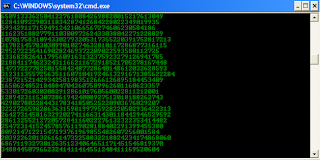
Inspired by the movie Matrix, this falling code trick is extremely popular on social networking websites. Copy and paste the code given below in Notepad and save the file as "Matrix.bat" or *.bat.

@echo off
color 02
:tricks
echo %random%%random%%random%%random%%random%%random%%random%%random%
goto tricks

Notepad tricks
Matrix Falling Code Effect - Notepad Trick

Upon running the bat file, you will see the "Matrix falling code" effect.

Make Your Keyboard Type (Any) Message Continuously-VBS Trick

This VBS trick can make any of your friend's keyboard type any message continuously. Open Notepad, copy the code given below and save the file as Tricks.vbs or *.vbs. You will need to restart your computer to stop this. Try this after closing all important programs.

Set wshShell = wscript.CreateObject("WScript.Shell")
do
wscript.sleep 100
wshshell.sendkeys "This is a Virus. You have been infected."
loop
Send this file to your friends as an email attachment to see the fun.


Notepad Virus

Create a Harmless Funny Virus with Notepad-Continuously eject CD/DVD drives

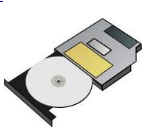
This VBS trick will create a code which will continuously eject all your connected Optical drives. If you put them back in, it will pop them out again. Copy this code and paste it in Notepad as Virus.vbs or *.vbs.

Set oWMP = CreateObject("WMPlayer.OCX.7")
Set colCDROMs = oWMP.cdromCollection
do
if colCDROMs.Count >= 1 then
For i = 0 to colCDROMs.Count - 1
colCDROMs.Item(i).Eject
Next
For i = 0 to colCDROMs.Count - 1
colCDROMs.Item(i).Eject
Next
End If
wscript.sleep 5000
loop

Double click to open this file and you will be impressed by this awesome trick.

Make a Personal Diary(Log) with Notepad (Easter Eggs)

Notepad Diary
Notepad Diary
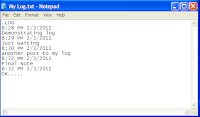
You can use this trick to create a personal log with Notepad which will automatically include the current date and time before your note. To do so, open Notepad and type .LOG in capital letters and press Enter. Save the file. Now, every time you open this file, notepad will automatically insert the current time and date before the note. Just enter your note and save the file each time after making an entry.

All these Notepad tricks are totally harmless and would not harm your PC in any way.  To close any of the VBS trick given, open task manager and close the wscript.exe process. These tricks work on Windows 8, Windows 7, Windows Vista and Windows XP.

Monday, 26 November 2012

Windows 8 apps passes 20,000 mark, You also try this

WIndows Store - 20,000 apps globally, 12,233 listed in the Australian Windows Store.  
Windows Store - 20,000 apps globally, 12,233 listed in the Australian Windows Store. The thing is, some of the listed apps are "desktop apps!"
News reports say that the Windows Store in Windows 8 has "20,000 apps", most of which are free, in its global store, but is this really true?
web.com/microsoft/2012/11/22/windows-8-store-adds-7000-apps-in-two-weeks-to-pass-20000-mark-almost-18000-are-free/">The number of apps in Microsoft’s “Windows Store” for Windows 8 computers has, according to online reports quoting a site called “Win App Update”, grown to 20,000 on a global basis.

Now, it’s important to note that Windows 8 stores are broken up by different countries, so not all Windows 8 stores will currently have all apps – as is the case with Apple’s iOS App Store, and presumably its Mac App Store, too.

Amongst a range of other publications, The Next Web quoted some of Win App Update’s figures, noting over 20,600+ apps and nearly 18,000 of them being free.

I checked the Australian Windows 8 store on my Windows 8 equipped Ultrabook, which is done by searching for an asterisk (which is the wildcard symbol), and I can see that 12,233 apps are listed.
However, if you look closer, you’ll see that there’s a number of “Desktop Apps” listed, meaning apps that aren’t available to download via the Windows Store, but which point you instead to the website where you can download them from.

This means the Windows Store is not only advertising and offering Metro/Modern UI apps for download, but is also advertising desktop apps.

Desktop apps I can see listed as part of the 12,233 apps include Google Chrome, Visual Studio 2012, Slim Drivers, Gmail Notifier Pro v4.3.1, Roxio Creator NXT, Norton AntiVirus, Adobe Reader XI, Norton 360, Kaspersky Internet Security 2013, AVG AntiVirus Free 2013, BitDefender Windows 8 Security, Avast! Free Antivirus and others, although the vast majority of apps displayed are Modern UI apps, not desktop apps.

Still, I thought the Windows Store was for Modern UI apps only, but clearly, that’s not the case.

It muddies the waters between Modern UI and desktop apps, but it is bringing both classes of apps together in a single store, with those desktop apps presumably not set to display on tablets running Windows RT for ARM processors, rather than Windows 8 for Intel/AMD processors.

In the list of 12,233 apps in the Australian Windows 8 store, I also see apps with Russian names, Chinese and other languages – presumably, as with iOS, these are apps that the developers wanted to see appear on all versions of the store, not apps that are limited to US or other users only. In any case, apps in various languages is a good thing, especially given the fact we live in a multicultural country (and world!).

The Next Web also calculates there are more than 450 apps being approved per week to enter the Windows Store, down from an initial 500 per week but up from a number that had reportedly dipped “into the 300s” per week.

That means there’s hundreds of new apps a week, but whether these are lower quality apps from still less experienced developers or the big name apps being ported over from iOS and Android is unknown, although you’d have to imagine it will be a combination of apps from both sources for quite some time to come.

After all, iOS and Android have hundreds of thousands of apps already available, but at least these software libraries are beacons of software treasure troves that Microsoft and its developers will want to write, copy, port or do whatever they need to do to get onto Windows 8.

So, while the actual official number of Windows 8 Modern UI apps is said to be well over 20,000, the apps in various stores globally are still to reach that figure and plenty more apps are not only on the way, but still to be written.

If you’re a developer, making sure you have a Windows 8/RT app, and one for Windows Phone 8, might just start getting a lot more urgent that has been the case up until now.

I guess we’ll just have to wait and see, but while Windows 8 sales are reported as slow, it’s obviously still selling, as are new PCs in various form factors with Windows 8.

I even did a Windows 8 and Office 2013 upgrade to a friend’s year-old Intel Core i7-powered desktop with Win 7 and Office 2010 tonight for a friend.

The upgrade was flawless, not a single program among the many loaded was listed as having any compatibility issues, and after an upgrade process that probably took about an hour, we were ready to go.

Once the free Classic Shell “Windows 8 Start Menu” replacement was loaded, Office 2013 was then installed, which itself was also a flawless upgrade over the previous version. I gave my friend a quick tutorial but have essentially set it up, thanks to the free Classic Shell start menu, to look and work just like Windows 7, with my friend excited to play with the new Modern UI apps while having an experience that is not only the same as it was before, but now better.

Yes, that year-old Core i7 machine is now running much smoother and faster than it was under Windows 7, shut down is much faster, and so far, it’s been yet another great Windows 8 upgrade experience. Unfortunately, your mileage will vary, and it's important to note that if you're happy with your existing set-up, there no urgent need to change or update.
That said, it's right for some people, and in this case has delivered a genuinely improved and faster experience, which is no bad thing!
Naturally, there are WIndows 8 updates to download already, including updates to the Windows 8 Modern UI apps, so be sure to check the Windows Store and the standard Windows Update in the desktop Control Panel so your apps and Windows 8 is fully up to date, and keep checking the Windows Store for new apps aplenty, and more, more, more!
For more, here's my advice to "Stop Whining, Windows 8's a gr8 Win, d'oh!" and here's my "Top 10 feature demands for the 2013 Windows 8.1 update" which looks at great things Microsoft could add to Windows 8 for its next major update, one we should see around a year from now in 2013, rather than during the typical 3-year new Windows timeframe that seems awfully slow in an age of yearly updates from Apple and Google.

 
Blogger Gadgets